🔔 Notifications
Notifications is a Go-based notification service used by MOS to deliver system and service notifications. Notifications can be displayed directly within the MOS WebUI and optionally forwarded to external notification providers.
Multiple providers can be enabled at the same time. If no provider is configured, notifications will still be shown inside MOS only.
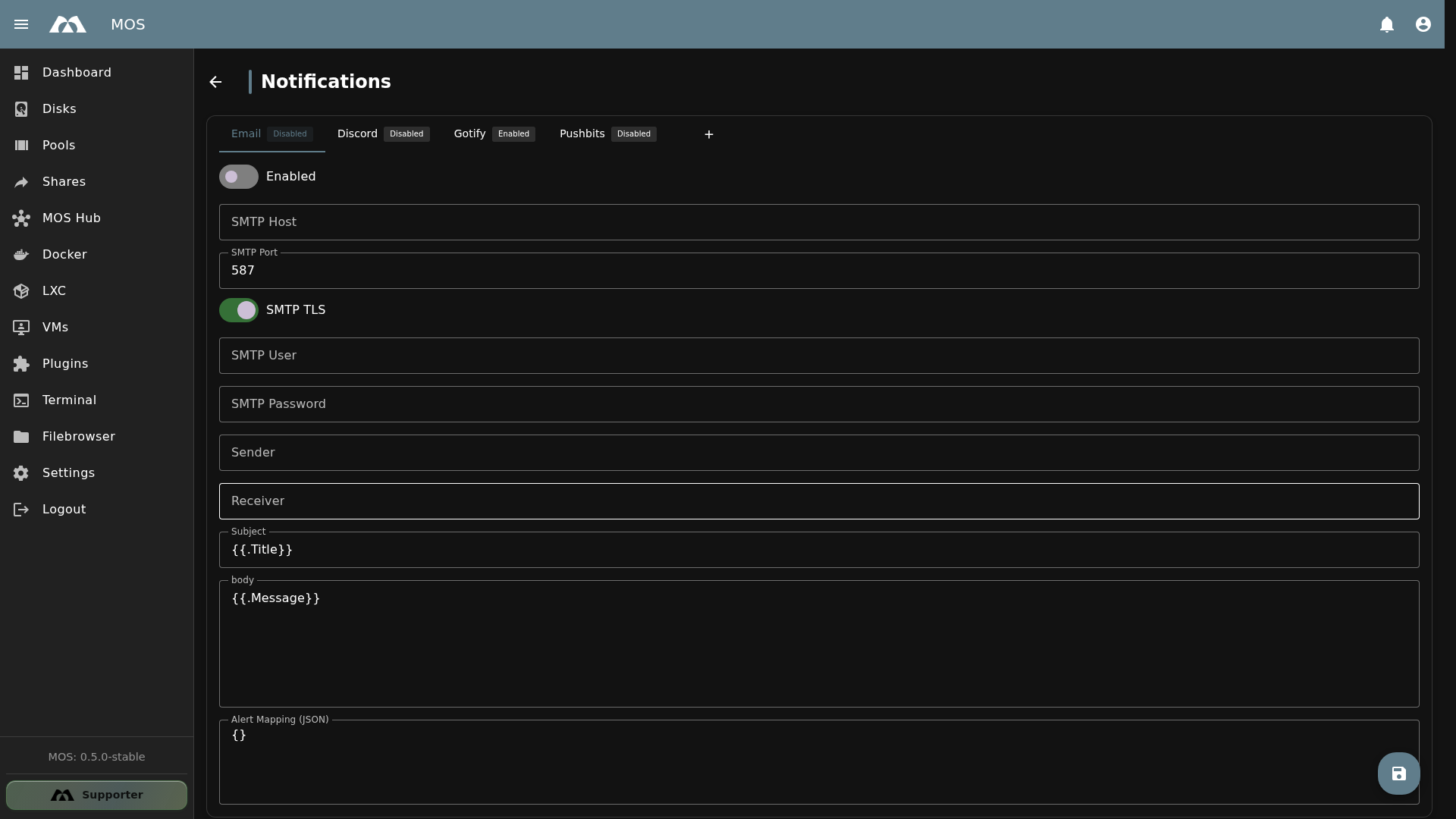
The Notifications configuration page showing all available providers.
📦 Accessing Notifications
The Notifications configuration is available under Settings.
- Navigate to Settings in the sidebar
- Go to System Configuration → Notifications
📡 Supported Providers
MOS Notify supports the following notification providers:
| Provider | Type | Description |
|---|---|---|
| SMTP | Send notifications via email using an SMTP server | |
| Discord | Webhook | Send notifications to a Discord channel via webhook |
| Gotify | API | Send notifications to a self-hosted Gotify server |
| Pushbits | API | Send notifications to a self-hosted Pushbits instance |
Multiple providers can be enabled simultaneously. If no external provider is configured, notifications will still be displayed inside the MOS WebUI.
⚙️ Provider Configuration
Each provider can be toggled on or off independently. Click on a provider name in the list to expand its configuration fields.
✉️ Email
The Email provider sends notifications via SMTP.
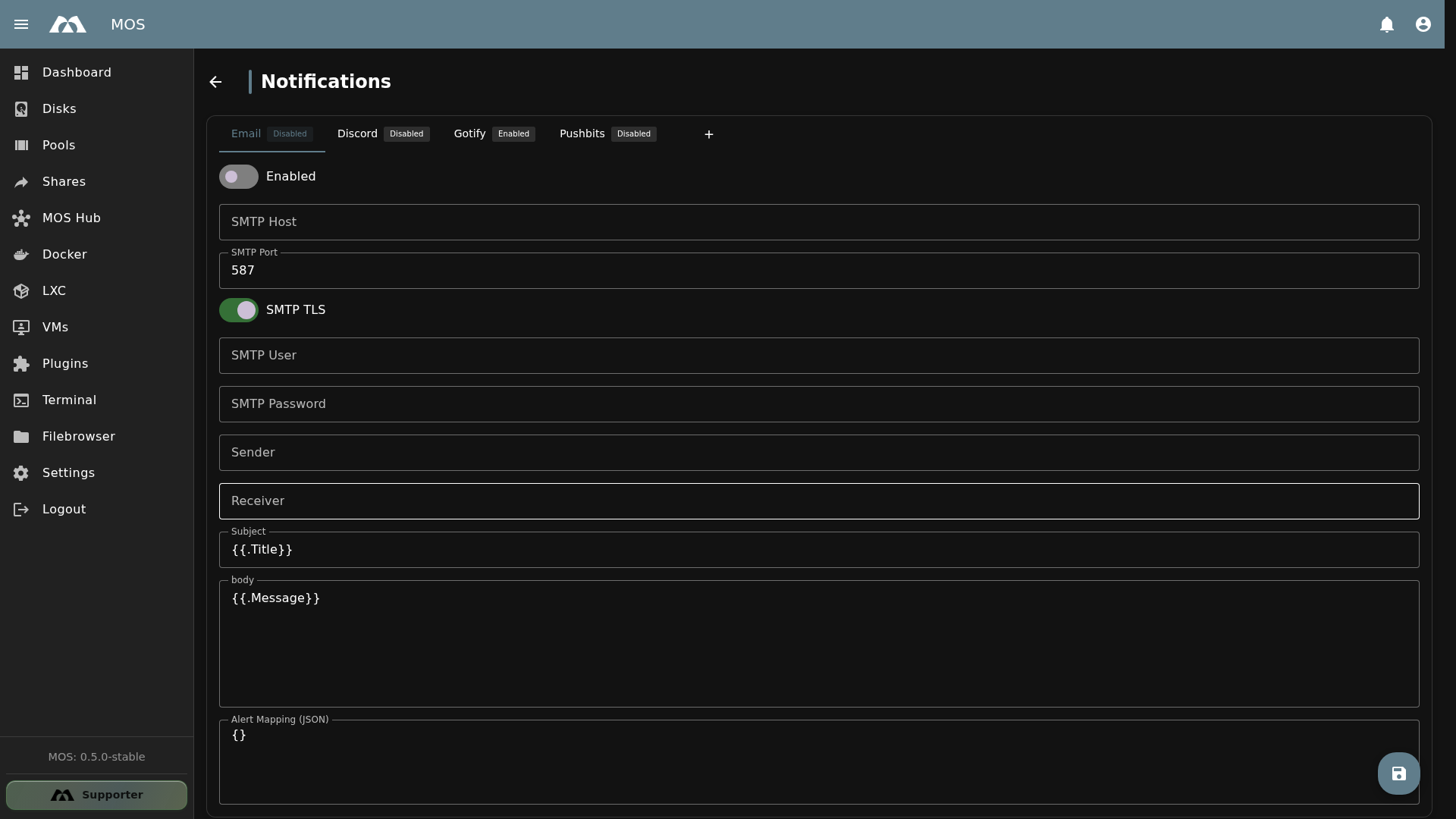
Email provider configuration.
| Field | Type | Default | Description |
|---|---|---|---|
| Enabled | Toggle | Off | Enables or disables the Email provider |
| SMTP Host | Text | — | SMTP server hostname (e.g., smtp.gmail.com) |
| SMTP Port | Number | 587 | SMTP server port (587 for TLS, 465 for SSL) |
| SMTP TLS | Toggle | On | Enables TLS encryption for the SMTP connection |
| SMTP User | Text | — | SMTP authentication username |
| SMTP Password | Password | — | SMTP authentication password |
| Sender | — | Email address used as the sender | |
| Receiver | Text | — | Email address that receives the notifications |
| Subject | Text | {{.Title}} | Email subject template (supports template variables) |
| Body | Text | {{.Message}} | Email body template (supports template variables) |
| Alert Mapping (JSON) | JSON | {} | Maps alert types to specific notification behavior |
Use template variables like {{.Title}} and {{.Message}} in the Subject and Body fields to include dynamic notification content.
💬 Discord
The Discord provider sends notifications to a Discord channel via a webhook URL.
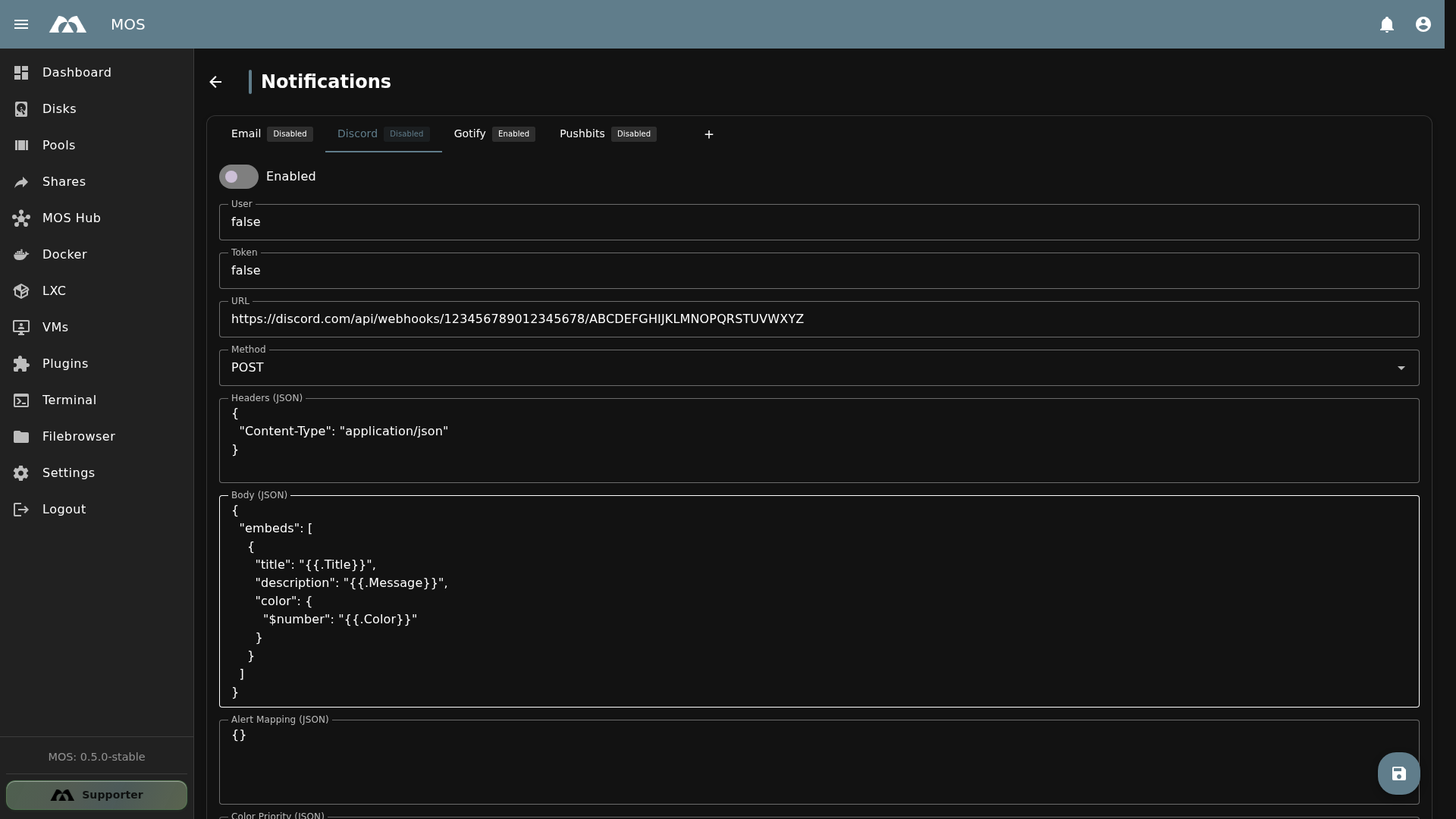
Discord provider configuration.
| Field | Type | Default | Description |
|---|---|---|---|
| Enabled | Toggle | Off | Enables or disables the Discord provider |
| User | Text | — | Username to display in Discord messages |
| Token | Text | — | Discord webhook token |
| URL | Text | — | Discord webhook URL |
| Method | Dropdown | POST | HTTP method for the webhook request |
| Headers (JSON) | JSON | — | Custom HTTP headers for the webhook request |
| Body (JSON) | JSON | — | Request body payload (supports template variables) |
| Alert Mapping (JSON) | JSON | — | Maps alert types to specific notification behavior |
| Color Priority (JSON) | JSON | — | Defines embed colors based on priority levels |
| Delete Provider | Button | — | Removes this provider configuration |
📱 Gotify
The Gotify provider sends notifications to a self-hosted Gotify server.
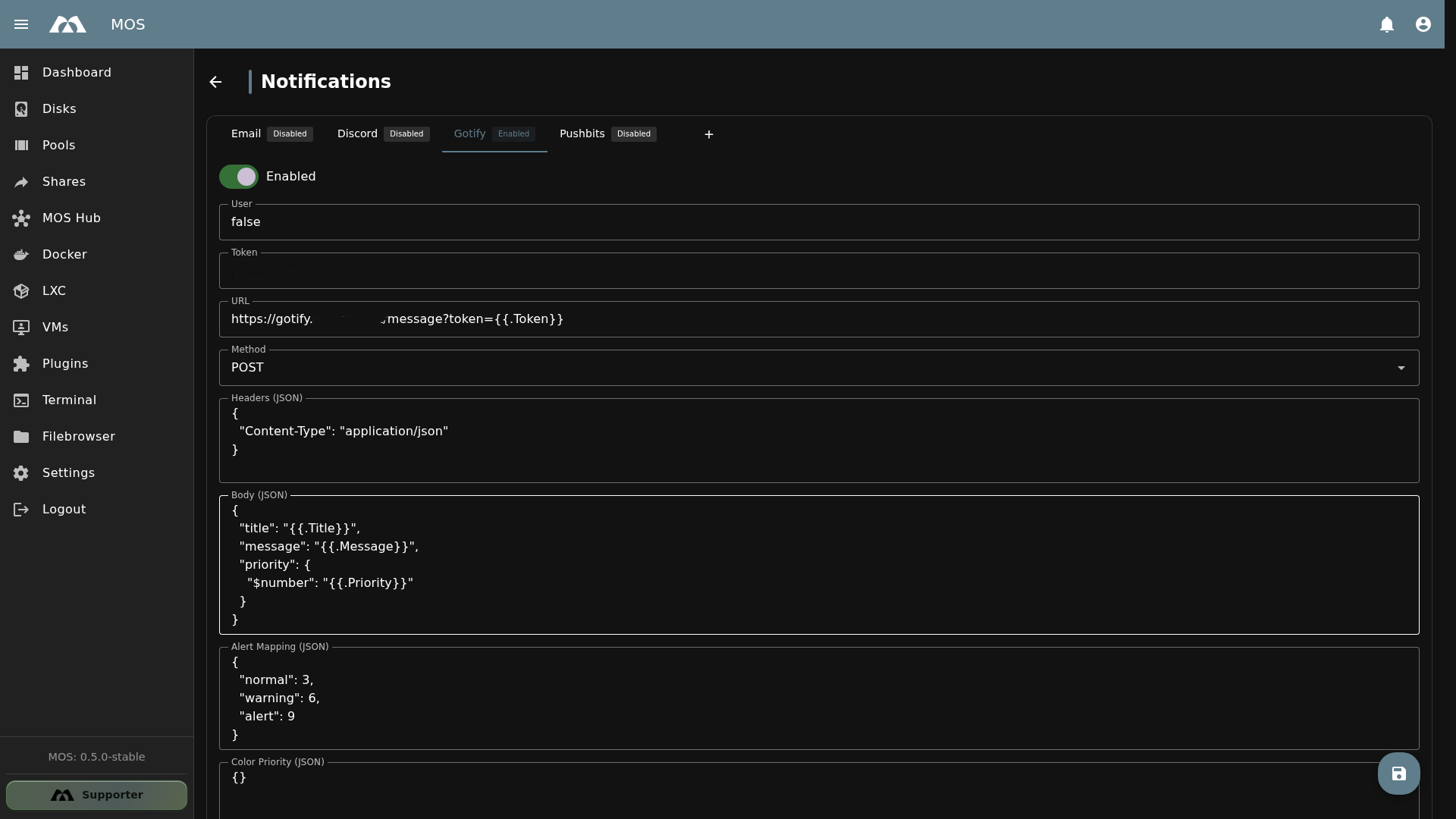
Gotify provider configuration.
| Field | Type | Default | Description |
|---|---|---|---|
| Enabled | Toggle | Off | Enables or disables the Gotify provider |
| User | Text | — | Gotify username |
| Token | Text | — | Gotify application token |
| URL | Text | — | Gotify server URL |
| Method | Dropdown | POST | HTTP method for the API request |
| Headers (JSON) | JSON | — | Custom HTTP headers |
| Body (JSON) | JSON | — | Request body payload (supports template variables) |
| Alert Mapping (JSON) | JSON | — | Maps alert types to specific notification behavior |
| Color Priority (JSON) | JSON | — | Defines notification colors based on priority |
| Delete Provider | Button | — | Removes this provider configuration |
🔔 Pushbits
The Pushbits provider sends notifications to a self-hosted Pushbits instance.
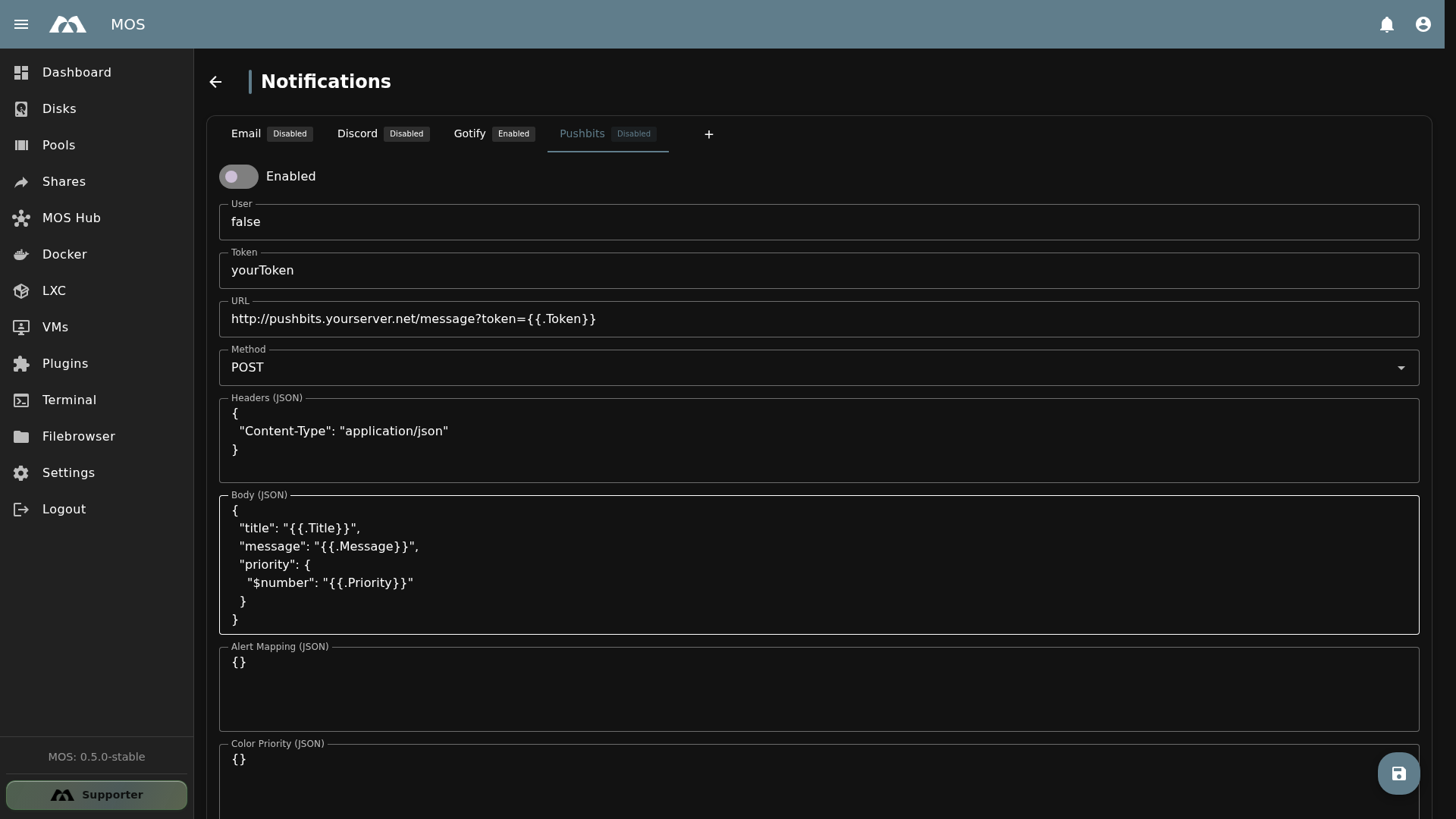
Pushbits provider configuration.
| Field | Type | Default | Description |
|---|---|---|---|
| Enabled | Toggle | Off | Enables or disables the Pushbits provider |
| User | Text | — | Pushbits username |
| Token | Text | — | Pushbits application token |
| URL | Text | — | Pushbits server URL |
| Method | Dropdown | POST | HTTP method for the API request |
| Headers (JSON) | JSON | — | Custom HTTP headers |
| Body (JSON) | JSON | — | Request body payload (supports template variables) |
| Alert Mapping (JSON) | JSON | — | Maps alert types to specific notification behavior |
| Color Priority (JSON) | JSON | — | Defines notification colors based on priority |
| Delete Provider | Button | — | Removes this provider configuration |
➕ Adding Custom Providers
Custom providers can be added via the + (floating action button) in the bottom-right corner of the Notifications page.
This allows you to configure additional webhook-based notification providers that follow the same field structure as Discord, Gotify, and Pushbits (User, Token, URL, Method, Headers, Body, Alert Mapping, Color Priority).
If you have implemented a new provider and would like to share it, please open a Pull Request at: github.com/mos-nas/mos-boot-files
🔧 Manual Configuration (Advanced)
In addition to the WebUI configuration, provider settings can also be managed manually via configuration files:
- Config directory:
/boot/config/notify/providers/ - Each provider has its own configuration file
After changing any provider configuration file manually, the service must be restarted:
/etc/init.d/notify restart
Logs are available at /var/log/notify or via the MOS Frontend under Settings → Logs.
Manual configuration changes may be overwritten by the WebUI. Use the WebUI as the primary configuration method and manual editing only for advanced scenarios.
📋 Alert Mapping (JSON)
The Alert Mapping field allows you to map different alert types to specific notification behavior. The mapping is defined as a JSON object.
Example:
{
  "warning": {
    "priority": 5,
    "suppress_repeat": true
  },
  "critical": {
    "priority": 10,
    "suppress_repeat": false
  }
}
This allows fine-grained control over how different types of alerts are delivered through each provider.
📚 Best Practices
- Start with one provider — Configure Email first, as it's the most universally useful
- Use app passwords — For Gmail, Outlook, etc., use app-specific passwords instead of your account password
- Test notifications — After configuring a provider, trigger a test notification to verify it works
- Enable multiple providers — Use Email for important alerts and Discord/Gotify for real-time notifications
- Use Alert Mapping — Configure different behavior for warnings vs. critical alerts
- Check logs — If notifications aren't working, check
/var/log/notifyor Settings → Logs
✅ Summary
The Notify service provides flexible notification delivery for MOS system events.
Key points:
- Four built-in providers — Email, Discord, Gotify, Pushbits
- WebUI configuration — all providers can be configured directly from the browser
- Custom providers — add additional webhook-based providers via the + button
- Template variables — use
{{.Title}}and{{.Message}}in subject/body fields - Alert Mapping — fine-grained control over alert types and priorities
- Multiple providers — enable several providers simultaneously
- Manual config — advanced configuration via
/boot/config/notify/providers/
Proper notification configuration ensures you stay informed about system events, disk warnings, backup status, and other important alerts.
Parts of this documentation were created with the assistance of AI tools. All AI-generated content has undergone review, but it may still contain inaccuracies, omissions, or outdated information.